Showing posts with label DB2. Show all posts

Wednesday, November 10, 2010

Update DB2: SQL query exceeds specified time limit or storage limit


Hey Reader,
I wrote a .Net console application to read data from SQL Server and update respective table in DB2. So the update query is built dynamically in the code. The connection used was ODBC. When command.ExecuteNonQuery method is processed there occured an exception with the following message.

Message:
Message = "ERROR [HY000] [IBM][iSeries Access ODBC Driver][DB2 UDB]SQL0666 - SQL query exceeds specified time limit or storage limit."

When googled came acorss this beautiful
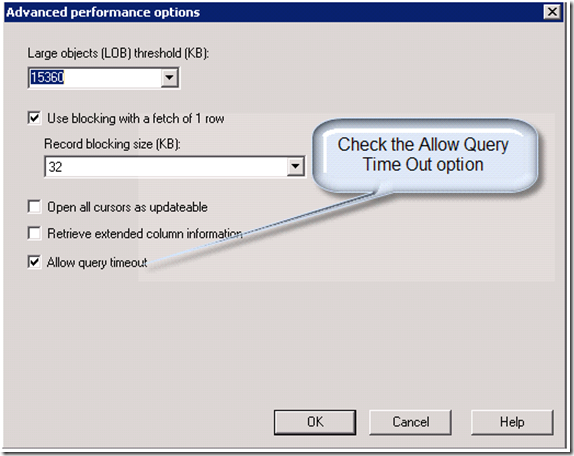
post. And the solution is in ODBC properties under Performance tab , under Advance, we just need to uncheck the option - "Allow query timeout".
the trick worked for me :)
Hope it helpz
Fauzi


Monday, November 8, 2010

Sample to Connect DB2 through DOTNET

Dear Reader,
Here is a sample to connect DB2 through .Net Applicaiton, Create for a friend, thought this must be useful for people looking for it.

Code:
------
using System;
using System.Collections.Generic;
using System.Linq;
using System.Text;
using System.Data.Odbc;
using System.Data;

namespace DB2_ODBC_Sample
{
class Program
{
static void Main(string[] args)
{
try
{
OdbcCommand cmd = null;
OdbcConnection con = null;
OdbcDataReader myReader = null;

con = new OdbcConnection("DSN=[YOURDSN];UID=[YOUR USERNAME];PWD=[YOUR PASSWORD];" + "Driver={IBM DB2 ODBC DRIVER};");
cmd = new OdbcCommand();
cmd.Connection = con;

cmd.CommandText = "SELECT * FROM SOMETABLE fetch first 5 rows only";

cmd.CommandTimeout = 0;
con.Open();
myReader = cmd.ExecuteReader(System.Data.CommandBehavior.KeyInfo);
aawservice objaawservice = new aawservice();
DataSet objDataSet = objaawservice.ConvertDataReaderToDataSet(myReader);
con.Close();
for (int i = 0; i < objDataSet.Tables[0].Rows.Count; i++)
{
Console.WriteLine("\n");
Console.WriteLine(objDataSet.Tables[0].Rows[i][2].ToString());

}
Console.Write("\nPress [Enter] to Exit ... ");
Console.ReadLine();
}
catch (Exception ex)
{
Console.WriteLine(ex.Message);
}
}
}

}
class aawservice
{
public DataSet ConvertDataReaderToDataSet(System.Data.Odbc.OdbcDataReader reader)
{
DataSet dataSet = new DataSet();
do
{
// Create data table in runtime
DataTable schemaTable = reader.GetSchemaTable();
DataTable dataTable = new DataTable();

if (schemaTable != null)
{
for (int i = 0; i < schemaTable.Rows.Count; i++)
{
DataRow dataRow = schemaTable.Rows[i];

// Create a column name as provided in Schema
string columnName = (string)dataRow["ColumnName"];

// Define Column Type here
DataColumn column = new DataColumn(columnName, (Type)dataRow["DataType"]);

//Adding Column to table
dataTable.Columns.Add(column);
}

dataSet.Tables.Add(dataTable);

// Fill the data table from reader data

while (reader.Read())
{
DataRow dataRow = dataTable.NewRow();
for (int i = 0; i < reader.FieldCount; i++)
dataRow[i] = reader.GetValue(i);
dataTable.Rows.Add(dataRow);
}
}

else
{
// No records were returned
DataColumn column = new DataColumn("RowsAffected");
dataTable.Columns.Add(column);
dataSet.Tables.Add(dataTable);
DataRow dataRow = dataTable.NewRow();
dataRow[0] = reader.RecordsAffected;
dataTable.Rows.Add(dataRow);
}
}
while (reader.NextResult());
return dataSet;
}
}

Wednesday, August 19, 2009

Sample to connnect DB2

Hi...

So far we have written applications to talk to various Databases. This is the first time, wrote a C# .Net console application to fetch records from DB2. Following is the sample code.

Code:

using System;

using System.Collections.Generic;

using System.Text;

using System.Data.Odbc;

class Program

{

static void Main()

{

OdbcCommand cmd = null;

OdbcConnection con = null;

OdbcDataReader rdr = null;

try

{

con = new OdbcConnection("DSN={LibName};UID={User Name};PWD={Password};" + "Driver={IBM DB2 ODBC DRIVER};");

cmd = new OdbcCommand();

cmd.Connection = con;

cmd.CommandText = "SELECT * FROM SOMETABLE";

cmd.comCommandTimeout = 20;

con.Open();

rdr = cmd.ExecuteReader(System.Data.CommandBehavior.SingleResult);

int intCount = 0;

while (rdr.Read())

{

intCount++;

Console.WriteLine(rdr.GetString(2).ToString() + ", " + rdr.GetString(3) + " ->" + intCount.ToString());

}

con.Close();

Console.ReadLine();

}

catch (OdbcException myException)

{

}

}

}


Regards
Fauzi

Thursday, August 13, 2009

Cannot convert between unicode and non-unicode string data types


Hey,

I was creating a Integration service which needs to fetch data from a POS (Point of Sale) application and migrate to JDE ERP system. The Source is MS Access Database & the destination tables are in JD-Edwards DB2. In between there are vital manipulation logic to be done, which is taken care in MS SQL Server with the help of SSIS. When i was creating OleDB data destination for DB2 there were lot of issues. I am really thankful to this thread in MSDN http://social.msdn.microsoft.com/Forums/en-US/sqlintegrationservices/thread/4128e62f-92d1-4125-baa3-fdd9fed59d48 which solved the connectivety issues. The final data flow there supposed to migrate data from SQL server to DB2. The problem i faced & invested lot of hours was on this error..

"
Cannot convert between unicode and non-unicode string data types"

To solve lot of people gave lot of advices in forum
http://social.msdn.microsoft.com/Forums/en-US/sqlintegrationservices/thread/21646e0b-d742-467a-8880-255ebf198c46 .
Some people told Data conversion component is helpful ,In my case I am transferring data into Z-files. These are tables F4001Z & F4011Z which have 149 columns & 249 columns each. And doing mapping for each fields is a boring task...

Solution: From the error it is clear that the issue is converting unicode to non-unicode string. So What i did was, I created a Local table in SQL Server with same table structure of F4001Z & F4011Z tables (like F4001Z_local & F4011Z_local). And in Table creation SQL script, where ever there was nchar datatype, I replaced with varchar . Now in the source Data Flow section, the manipulated data will we inserted into these local tables F4001Z_local & F4011Z_local and then a Select query is run through a stored procedure. Doing so in the string is non-unicode string or DT_STR format we can say... The Error got resolved :) The screen shots says the rest, The data conversion component was placed before. I believe if we remove the component also the application would work fine....

Best Regards
Fauzi

Tuesday, August 11, 2009

SSIS: OleDB Data source: cannot retrieve the column code page info from the OLE DB provider

Hi,

When i tried to set a DB2 data source in a SSIS package, the following warning was shown when the clicked preview button.

Warning at {Local Component ID} [OLE DB Source [1]]:
Cannot retrieve the column code page info from the OLE DB provider. If the component supports the "DefaultCodePage" property, the code page from that property will be used. Change the value of the property if the current string code page values are incorrect. If the component does not support the property, the code page from the component's locale ID will be used.

Solution:
To resolve, Under properties -> Custom Properties -> set AlwaysUseDefaultCodePage : True

Resource: http://social.msdn.microsoft.com/Forums/en-US/sqlintegrationservices/thread/bb08af3a-5080-40d0-b00b-e278115cb2ad

Regards
Fauzi