Showing posts with label ODBC. Show all posts

Wednesday, November 10, 2010

Update DB2: SQL query exceeds specified time limit or storage limit


Hey Reader,
I wrote a .Net console application to read data from SQL Server and update respective table in DB2. So the update query is built dynamically in the code. The connection used was ODBC. When command.ExecuteNonQuery method is processed there occured an exception with the following message.

Message:
Message = "ERROR [HY000] [IBM][iSeries Access ODBC Driver][DB2 UDB]SQL0666 - SQL query exceeds specified time limit or storage limit."

When googled came acorss this beautiful
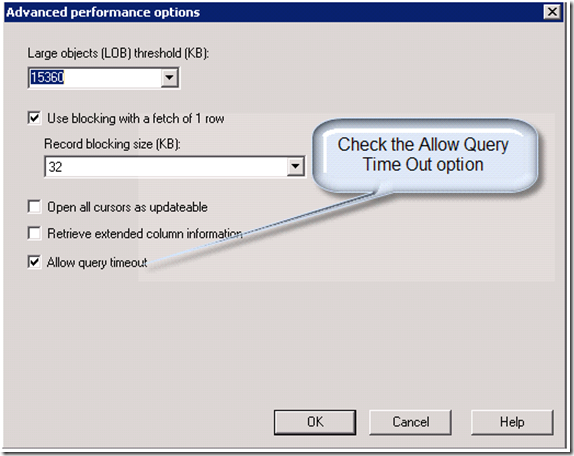
post. And the solution is in ODBC properties under Performance tab , under Advance, we just need to uncheck the option - "Allow query timeout".
the trick worked for me :)
Hope it helpz
Fauzi


Tuesday, July 14, 2009

Read MS Access through .Net

Hi,

I had a requirement to create a application to retrieve data from legacy MS-Access application.
I was looking for a sample in google. could'nt find one. So posting it so that it could be useful for people who is looking for the same.

I have created a DNS for the mdb file. used System.Data.Odbc; and rest are similar to how we do for SQL. following is the sample code.

static void Main(string[] args)

{

//Read Data from Access

OdbcConnection ODBCConnection = new System.Data.Odbc.OdbcConnection("DSN=DNS_Test_MSACCESS;UID=sam;PWD=mam;");

// ODBCConnection= new OdbcConnection(ConnString);

ODBCConnection.Open();

OdbcCommand ODBCCommand = new OdbcCommand("select * from Table1", ODBCConnection);

OdbcDataReader ODBCDataReader = ODBCCommand.ExecuteReader();

string s = "";

while (ODBCDataReader.Read())

{

s = s + "- " + ODBCDataReader.GetString(1);

}

Console.WriteLine(s);

ODBCConnection.Close();

}