Showing posts with label Dynamically. Show all posts

Tuesday, June 22, 2010

Execute a parameterised EXE dynamically inside SSIS

Hi Reader....

We had a requirement to run a same application for different POS(Point of sale) The challenge is to create a single application that takes parameters Store number as input parameter and does the required operation. Doing so we can use the same applicaiton any number of stores. In SSIS we have the module "Execute Process Task" to exectue exe files. I have given the file location in "Executalbe" property under Process Tab.
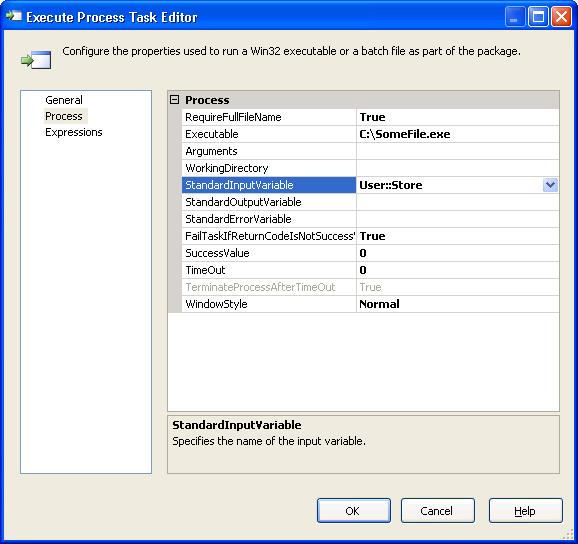


Regarding the Parameter, First i tried with 'args[0]' in the EXE Created from DotNet Console Applcaition, tried to use it as input parameters. Unfortunately it did'nt work. When i googled found that we can use Console.ReadLine() and get the required parameters in the EXE file And when you need to execute through SSIS(SQL Server Integration Services), we just need to pass the parameter (User Varaiable in SSIS, Eg: User::VarialbeName) in Standard Input Varaible property under Process.

This will pass the parameter dynamically during execution :-)

Regards
Fauzi

Tuesday, May 5, 2009

Read Resource file: Resource.resx dynamically thourgh C#

Dear Reader,


Following is a sample method to read a Resource file in your web application which resides in the location "App_GlobalResources\Resource.resx". The assembly references needed are


using System.Collections;

using System.Resources;


Is case if there is a message shown when solution is built


"The type or namespace name 'ResXResourceReader' does
not exist in the class or namespace 'System.Resources' (are you missing an
assembly reference?)"


Please refer ResXResourceReader missing an assembly reference


Source code:


public void ReadResourceresx()

{

//Creating a hashtable to store string in resource files

Hashtable resourceStringsHashTable = new Hashtable();

//Provide relative path of Resource file

string strResourceFilelocation = HttpContext.Current.Request.PhysicalApplicationPath.ToString() +

@"\App_GlobalResources\Resource.resx";

//Creating object for Class: ResXResourceReader

System.Resources.ResXResourceReader objResXResourceReader = null;

try

{

objResXResourceReader = new ResXResourceReader(strResourceFilelocation);

//Defines a DictonartEntry Key/Value to Set or retriev values

foreach (DictionaryEntry resourceString in objResXResourceReader)

{

if (!resourceStringsHashTable.Contains(resourceString.Key.ToString()))

{

//Adding values to HashTable one by one in a loop

resourceStringsHashTable.Add(resourceString.Key.ToString(), resourceString.Value);

}

}

}

finally

{

//Closing the created object

objResXResourceReader.Close();

}

}

Hope it helps :)

Regards

Fauzi