Showing posts with label SQL Server. Show all posts

Tuesday, June 22, 2010

Execute a parameterised EXE dynamically inside SSIS

Hi Reader....

We had a requirement to run a same application for different POS(Point of sale) The challenge is to create a single application that takes parameters Store number as input parameter and does the required operation. Doing so we can use the same applicaiton any number of stores. In SSIS we have the module "Execute Process Task" to exectue exe files. I have given the file location in "Executalbe" property under Process Tab.
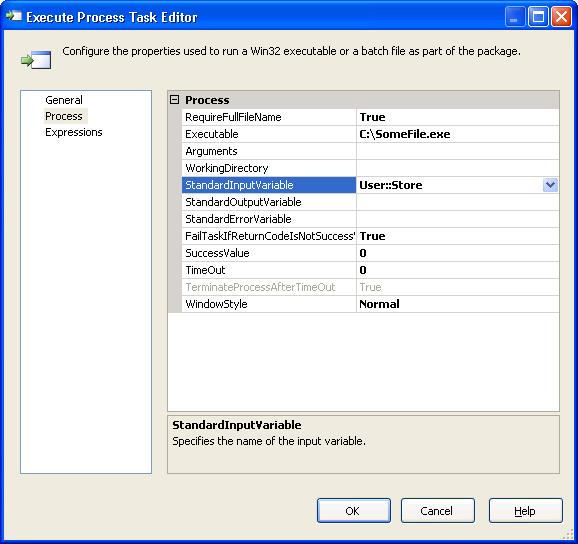


Regarding the Parameter, First i tried with 'args[0]' in the EXE Created from DotNet Console Applcaition, tried to use it as input parameters. Unfortunately it did'nt work. When i googled found that we can use Console.ReadLine() and get the required parameters in the EXE file And when you need to execute through SSIS(SQL Server Integration Services), we just need to pass the parameter (User Varaiable in SSIS, Eg: User::VarialbeName) in Standard Input Varaible property under Process.

This will pass the parameter dynamically during execution :-)

Regards
Fauzi

Friday, July 31, 2009

SQL: Temp Tables vs View

Folks...

I have created a DTSX package for a requirement which fetched data from MS access and store it in SQL Server.For business calculations there we some Views required. The final stored procedure will insert data into a table which will be utilized by a ERP system. The insert query was a bit complex like it called fields in a View which was created from a view (can call it a nested view?) & so on... The execution time was more than 30 mins :( So we need to optimize things for better performance....

now my next attempt will be to try it out with temp tables. [drafting post...]

Yes... In place of the views I used two temporary tables and one view i kept it as it is because, It was only displaying distinct values from a table.

This time to complete execution the Stored procedure took only 34.031 seconds...

Wow... that's a huge difference.... I believe using Temp tables optimized the stored procedure than views. The point to be noted here is that the decision to go for View & Temporary tables is based on the scenario... In my case Temp tables did the trick :)

Best Regards
Fauzi

Monday, July 27, 2009

SQL Server: How to generate script for tables WITH data

Hi,

If you have to generate script for your tables in database with data, you need to install Database Publishing Wizard for SQL Server. It is a free download from Microsoft website.

Link to Download

Localized version

After installation you need to run the following syntax in command prompt.

Syntax:

C:\Program Files\Microsoft SQL Server\90\Tools\Publishing>sqlpubwiz script -d YOURDB "C:\YOURDB.sql" -dataonly

The Following acknowledge will be displayed if the syntax is right...

Microsoft (R) SQL Server Database Publishing Wizard
Version 1.1.1.0
Copyright (c) Microsoft Corporation. All rights reserved.

Generating script for database YOURDB
- Generating only data script
- Generating script targeted for SQL Server 2005
Gathering list of objects to script
Scripting objects
..
Writing script to disk
Writing table dbo.Members
Writing table dbo.authors

Scripting completed for database YOURDB.

Thus your Script is generated & ready for use :)

Hope it help...

Regards
Fauzi

Monday, June 8, 2009

SQL Server Schedule Job : Unable to cast object of type

Hi Folks...

One of my pal, when he was trying to create SQL Server Job to call a SSIS he got the following error;

Unable to cast object of type 'Microsoft.SqlServer.Management.Smo.SimpleObjectKey' to type 'Microsoft.SqlServer.Management.Smo.Agent.JobObjectKey'. (Microsoft.SqlServer.Smo)

When we googled for the same it was mentioned in lot of forums that the it worked fine once we install SQL Server 2005 service pack 2 (SP 2)

Reference: http://social.msdn.microsoft.com/Forums/en-US/sqltools/thread/e7c0e73e-8d4b-4624-a19e-352a69995f9e

Download: Microsoft SQL Server 2005 Service Pack 2

Regards
Fauzi ~ 4Z

Friday, May 22, 2009

NVARCHAR vs VARCHAR

When i goggled to find the difference between using NVARCHAR versus VARCHAR, found this neat & simple explanation on the same:

http://weblogs.asp.net/guys/archive/2005/01/15/353550.aspx

Monday, March 9, 2009

Asp.Net Open Source Applications list

Hi,

Found this useful link which lists well know Asp.net open source applications & their respective url's to download.

http://www.blogfodder.co.uk/post/2008/07/List-Of-Free--Open-Source-ASPNET-Web-Applications.aspx

Hope it is helpful :)

Regards
Fauzi