Wednesday, May 11, 2011

Searh for a text in whole database SQL

Hi,

There was a requirement to search for a text in the whole SQL database. found this Stored procedure very useful. though it is worth sharing...
Resource: http://vyaskn.tripod.com/search_all_columns_in_all_tables.htm

-- SearchAllTables ''

CREATE PROC SearchAllTables

(

@SearchStr nvarchar(100)

)

AS

BEGIN

CREATE TABLE #Results (ColumnName nvarchar(370), ColumnValue nvarchar(3630))

SET NOCOUNT ON

DECLARE @TableName nvarchar(256), @ColumnName nvarchar(128), @SearchStr2 nvarchar(110)

SET @TableName = ''

SET @SearchStr2 = QUOTENAME('%' + @SearchStr + '%','''')

WHILE @TableName IS NOT NULL

BEGIN

SET @ColumnName = ''

SET @TableName =

(

SELECT MIN(QUOTENAME(TABLE_SCHEMA) + '.' + QUOTENAME(TABLE_NAME))

FROM INFORMATION_SCHEMA.TABLES

WHERE TABLE_TYPE = 'BASE TABLE'

AND QUOTENAME(TABLE_SCHEMA) + '.' + QUOTENAME(TABLE_NAME) > @TableName

AND OBJECTPROPERTY(

OBJECT_ID(

QUOTENAME(TABLE_SCHEMA) + '.' + QUOTENAME(TABLE_NAME)

), 'IsMSShipped'

) = 0

)

WHILE (@TableName IS NOT NULL) AND (@ColumnName IS NOT NULL)

BEGIN

SET @ColumnName =

(

SELECT MIN(QUOTENAME(COLUMN_NAME))

FROM INFORMATION_SCHEMA.COLUMNS

WHERE TABLE_SCHEMA = PARSENAME(@TableName, 2)

AND TABLE_NAME = PARSENAME(@TableName, 1)

AND DATA_TYPE IN ('char', 'varchar', 'nchar', 'nvarchar')

AND QUOTENAME(COLUMN_NAME) > @ColumnName

)

IF @ColumnName IS NOT NULL

BEGIN

INSERT INTO #Results

EXEC

(

'SELECT ''' + @TableName + '.' + @ColumnName + ''', LEFT(' + @ColumnName + ', 3630)

FROM ' + @TableName + ' (NOLOCK) ' +

' WHERE ' + @ColumnName + ' LIKE ' + @SearchStr2

)

END

END

END

SELECT ColumnName, ColumnValue FROM #Results

END

Thursday, April 14, 2011

SQL to generate Script for All stored procedures in a Database

Hi,
I had a requirment to create a local copy of a MS SQL Database hosted on remote environment(Godaddy Hosting). With the help for Import Data option in SQL Server Managment studio, I was able to replicate both the Tables & their respective Data. Since there no option to import Stored procedures. I was looking in google to generate SQL script for all the stored procedures from a Database.


List All Stored Procedure in Database: select * from sys.procedures

Fortunate to find this post: http://blogs.lessthandot.com/index.php/DataMgmt/DataDesign/how-to-script-all-stored-procedures-in-a


set nocount on
DECLARE @Test TABLE (Id INT IDENTITY(1,1), Code varchar(max))

INSERT INTO @Test (Code)
SELECT 'IF object_ID(N''[' + schema_name(schema_id) + '].[' + Name + ']'') IS NOT NULL
DROP PROCEDURE ['+ schema_name(schema_id) +' ].[' + Name + ']' + char(13) + char(10) + 'GO' +
OBJECT_DEFINITION(OBJECT_ID) + char(13) +char(10) + 'GO' + char(13) + char(10)
from sys.procedures
where is_ms_shipped = 0

DECLARE @lnCurrent int, @lnMax int
DECLARE @LongName varchar(max)

SELECT @lnMax = MAX(Id) FROM @Test
SET @lnCurrent = 1
WHILE @lnCurrent <= @lnMax BEGIN SELECT @LongName = Code FROM @Test WHERE Id = @lnCurrent WHILE @LongName <> ''
BEGIN
print LEFT(@LongName,8000)
SET @LongName = SUBSTRING(@LongName, 8001, LEN(@LongName))
END
SET @lnCurrent = @lnCurrent + 1
END


Hope it Helps


4Z


Tuesday, February 8, 2011

UNZIP a zip file through C#

Hi,
We had a FTP location where our vendors place a ZIP file. The idea is to process file once it is placed through a listner application. So we need to unzip the placed file through an application. The API: ICSharpCode.SharpZipLib.Zip was very much helpful to achieve the same.

Sample source code is below:

using System;
using System.Collections.Generic;
using System.Text;
using ICSharpCode.SharpZipLib.Zip;
using System.IO;

namespace unzipper
{
class Program
{
static void Main(string[] args)
{
UnZipFiles("C:\\TEST\\SharpZipLib_0860_Bin.zip", "C:\\TEST\\", "", false);
}

public static void UnZipFiles(string zipPathAndFile, string outputFolder, string password, bool deleteZipFile)
{
ZipInputStream s = new ZipInputStream(File.OpenRead(zipPathAndFile));
if (password != null && password != String.Empty)
s.Password = password;
ZipEntry theEntry;
string tmpEntry = String.Empty;
while ((theEntry = s.GetNextEntry()) != null)
{
string directoryName = outputFolder;
string fileName = Path.GetFileName(theEntry.Name);
// create directory
if (directoryName != "")
{
Directory.CreateDirectory(directoryName);
}
if (fileName != String.Empty)
{
if (theEntry.Name.IndexOf(".ini") < fullpath =" directoryName" fullpath =" fullPath.Replace(" fulldirpath =" Path.GetDirectoryName(fullPath);" streamwriter =" File.Create(fullPath);" size =" 2048;" data =" new" size =" s.Read(data,"> 0)
{
streamWriter.Write(data, 0, size);
}
else
{
break;
}
}
streamWriter.Close();
}
}
}
s.Close();
if (deleteZipFile)
File.Delete(zipPathAndFile);
}
}
}

Hope it Helpz...
Reference: http://www.eggheadcafe.com/tutorials/aspnet/9ce6c242-c14c-4969-9251-af95e4cf320f/zip--unzip-folders-and-files-with-c.aspx
Regards
Fauzi

Sunday, January 9, 2011

Request for the permission of type 'System.Security.Permissions.FileIOPermission, mscorlib, Version=2.0.0.0, Culture=neutral, PublicKeyToken=b77a5c561

Hi,

We had a requirement to generate a PDF report in a table with all items for the selected vendor with their respective images. Thanks to ItextSharp for the wonderful utility to generate PDF's. Since we embed image in run time, while executing the part,
table.AddCell(image.Getinstance() we get the following exception:

"Request for the permission of type 'System.Security.Permissions.FileIOPermission, mscorlib, Version=2.0.0.0, Culture=neutral, PublicKeyToken=b77a5c561934e089' failed."

Googled for the message and found that the solution is that we need to set trust level as full in web.config. Since it is an internal application for us it is not a big deal in our case. Any ways planning to encrypt the PDFs as password protected.

Solution: trust level="Full" in web.config
Resource: http://forums.asp.net/p/1422162/3433380.aspx

Hope It Helps :)

Regards
Fauzi


Saturday, December 11, 2010

How to compile C program with Visual studio 2010

Hi,

Came across this blog on how to compile C program with Visual studio 2010.

http://channel9.msdn.com/blogs/sam/c-language-programming-with-visual-studio-2010-ultimate-pro-or-vc-express

Regards
4Z

Wednesday, November 10, 2010

Update DB2: SQL query exceeds specified time limit or storage limit


Hey Reader,
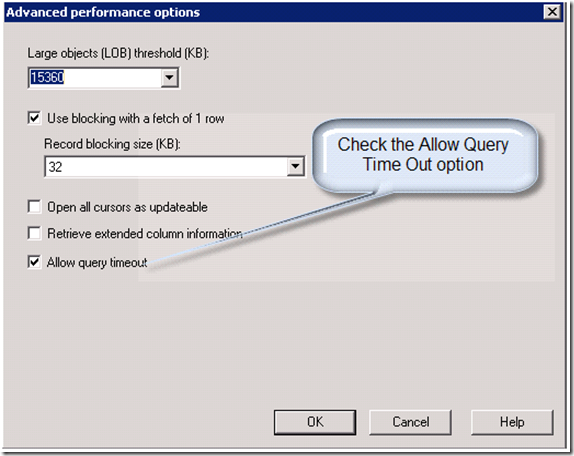
I wrote a .Net console application to read data from SQL Server and update respective table in DB2. So the update query is built dynamically in the code. The connection used was ODBC. When command.ExecuteNonQuery method is processed there occured an exception with the following message.

Message:
Message = "ERROR [HY000] [IBM][iSeries Access ODBC Driver][DB2 UDB]SQL0666 - SQL query exceeds specified time limit or storage limit."

When googled came acorss this beautiful
post. And the solution is in ODBC properties under Performance tab , under Advance, we just need to uncheck the option - "Allow query timeout".
the trick worked for me :)
Hope it helpz
Fauzi


Monday, November 8, 2010

Sample to Connect DB2 through DOTNET

Dear Reader,
Here is a sample to connect DB2 through .Net Applicaiton, Create for a friend, thought this must be useful for people looking for it.

Code:
------
using System;
using System.Collections.Generic;
using System.Linq;
using System.Text;
using System.Data.Odbc;
using System.Data;

namespace DB2_ODBC_Sample
{
class Program
{
static void Main(string[] args)
{
try
{
OdbcCommand cmd = null;
OdbcConnection con = null;
OdbcDataReader myReader = null;

con = new OdbcConnection("DSN=[YOURDSN];UID=[YOUR USERNAME];PWD=[YOUR PASSWORD];" + "Driver={IBM DB2 ODBC DRIVER};");
cmd = new OdbcCommand();
cmd.Connection = con;

cmd.CommandText = "SELECT * FROM SOMETABLE fetch first 5 rows only";

cmd.CommandTimeout = 0;
con.Open();
myReader = cmd.ExecuteReader(System.Data.CommandBehavior.KeyInfo);
aawservice objaawservice = new aawservice();
DataSet objDataSet = objaawservice.ConvertDataReaderToDataSet(myReader);
con.Close();
for (int i = 0; i < objDataSet.Tables[0].Rows.Count; i++)
{
Console.WriteLine("\n");
Console.WriteLine(objDataSet.Tables[0].Rows[i][2].ToString());

}
Console.Write("\nPress [Enter] to Exit ... ");
Console.ReadLine();
}
catch (Exception ex)
{
Console.WriteLine(ex.Message);
}
}
}

}
class aawservice
{
public DataSet ConvertDataReaderToDataSet(System.Data.Odbc.OdbcDataReader reader)
{
DataSet dataSet = new DataSet();
do
{
// Create data table in runtime
DataTable schemaTable = reader.GetSchemaTable();
DataTable dataTable = new DataTable();

if (schemaTable != null)
{
for (int i = 0; i < schemaTable.Rows.Count; i++)
{
DataRow dataRow = schemaTable.Rows[i];

// Create a column name as provided in Schema
string columnName = (string)dataRow["ColumnName"];

// Define Column Type here
DataColumn column = new DataColumn(columnName, (Type)dataRow["DataType"]);

//Adding Column to table
dataTable.Columns.Add(column);
}

dataSet.Tables.Add(dataTable);

// Fill the data table from reader data

while (reader.Read())
{
DataRow dataRow = dataTable.NewRow();
for (int i = 0; i < reader.FieldCount; i++)
dataRow[i] = reader.GetValue(i);
dataTable.Rows.Add(dataRow);
}
}

else
{
// No records were returned
DataColumn column = new DataColumn("RowsAffected");
dataTable.Columns.Add(column);
dataSet.Tables.Add(dataTable);
DataRow dataRow = dataTable.NewRow();
dataRow[0] = reader.RecordsAffected;
dataTable.Rows.Add(dataRow);
}
}
while (reader.NextResult());
return dataSet;
}
}