Hey Guys...
There was a small logical check missed in my automated blog(KuwaitFresh.com). And because of this there occured duplicate records which means duplicate posts! which will be not be accepted by any user :) Here is the query to delete duplicate records in your table...
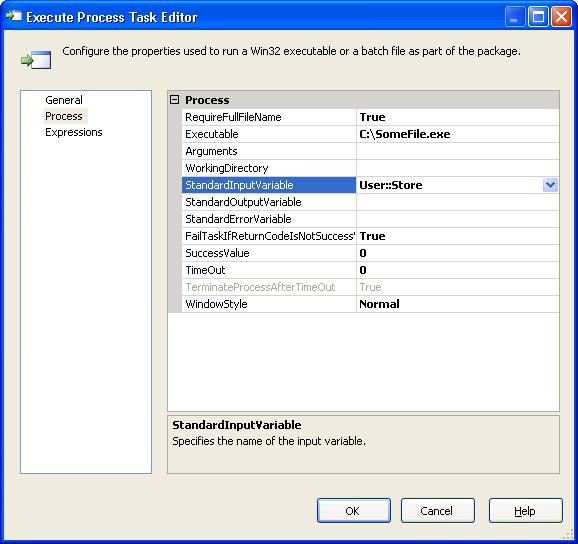
Hi Reader.... We had a requirement to run a same application for different POS(Point of sale) The challenge is to create a single application that takes parameters Store number as input parameter and does the required operation. Doing so we can use the same applicaiton any number of stores.In SSIS we have the module "Execute Process Task" to exectue exe files. I have given the file location in "Executalbe" property under Process Tab.
Regarding the Parameter, First i tried with 'args[0]' in the EXE Created from DotNet Console Applcaition, tried to use it as input parameters.Unfortunately it did'nt work. When i googled found that we can use Console.ReadLine() and get the required parameters in the EXE file And when you need to execute through SSIS(SQL Server Integration Services), we just need to pass the parameter (User Varaiable in SSIS, Eg: User::VarialbeName) in Standard Input Varaible property under Process.
This will pass the parameter dynamically during execution :-)
I was googling to find a query to give me the number of rows in all tables in a database. This was helpful to cross verify whether all records are moved to the hosting Database from my local database.