Sunday, January 9, 2011

Request for the permission of type 'System.Security.Permissions.FileIOPermission, mscorlib, Version=2.0.0.0, Culture=neutral, PublicKeyToken=b77a5c561

Hi,

We had a requirement to generate a PDF report in a table with all items for the selected vendor with their respective images. Thanks to ItextSharp for the wonderful utility to generate PDF's. Since we embed image in run time, while executing the part,
table.AddCell(image.Getinstance() we get the following exception:

"Request for the permission of type 'System.Security.Permissions.FileIOPermission, mscorlib, Version=2.0.0.0, Culture=neutral, PublicKeyToken=b77a5c561934e089' failed."

Googled for the message and found that the solution is that we need to set trust level as full in web.config. Since it is an internal application for us it is not a big deal in our case. Any ways planning to encrypt the PDFs as password protected.

Solution: trust level="Full" in web.config
Resource: http://forums.asp.net/p/1422162/3433380.aspx

Hope It Helps :)

Regards
Fauzi


Saturday, December 11, 2010

How to compile C program with Visual studio 2010

Hi,

Came across this blog on how to compile C program with Visual studio 2010.

http://channel9.msdn.com/blogs/sam/c-language-programming-with-visual-studio-2010-ultimate-pro-or-vc-express

Regards
4Z

Wednesday, November 10, 2010

Update DB2: SQL query exceeds specified time limit or storage limit


Hey Reader,
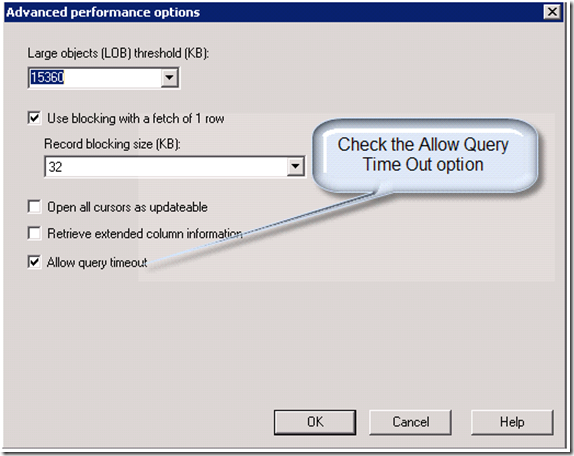
I wrote a .Net console application to read data from SQL Server and update respective table in DB2. So the update query is built dynamically in the code. The connection used was ODBC. When command.ExecuteNonQuery method is processed there occured an exception with the following message.

Message:
Message = "ERROR [HY000] [IBM][iSeries Access ODBC Driver][DB2 UDB]SQL0666 - SQL query exceeds specified time limit or storage limit."

When googled came acorss this beautiful
post. And the solution is in ODBC properties under Performance tab , under Advance, we just need to uncheck the option - "Allow query timeout".
the trick worked for me :)
Hope it helpz
Fauzi


Monday, November 8, 2010

Sample to Connect DB2 through DOTNET

Dear Reader,
Here is a sample to connect DB2 through .Net Applicaiton, Create for a friend, thought this must be useful for people looking for it.

Code:
------
using System;
using System.Collections.Generic;
using System.Linq;
using System.Text;
using System.Data.Odbc;
using System.Data;

namespace DB2_ODBC_Sample
{
class Program
{
static void Main(string[] args)
{
try
{
OdbcCommand cmd = null;
OdbcConnection con = null;
OdbcDataReader myReader = null;

con = new OdbcConnection("DSN=[YOURDSN];UID=[YOUR USERNAME];PWD=[YOUR PASSWORD];" + "Driver={IBM DB2 ODBC DRIVER};");
cmd = new OdbcCommand();
cmd.Connection = con;

cmd.CommandText = "SELECT * FROM SOMETABLE fetch first 5 rows only";

cmd.CommandTimeout = 0;
con.Open();
myReader = cmd.ExecuteReader(System.Data.CommandBehavior.KeyInfo);
aawservice objaawservice = new aawservice();
DataSet objDataSet = objaawservice.ConvertDataReaderToDataSet(myReader);
con.Close();
for (int i = 0; i < objDataSet.Tables[0].Rows.Count; i++)
{
Console.WriteLine("\n");
Console.WriteLine(objDataSet.Tables[0].Rows[i][2].ToString());

}
Console.Write("\nPress [Enter] to Exit ... ");
Console.ReadLine();
}
catch (Exception ex)
{
Console.WriteLine(ex.Message);
}
}
}

}
class aawservice
{
public DataSet ConvertDataReaderToDataSet(System.Data.Odbc.OdbcDataReader reader)
{
DataSet dataSet = new DataSet();
do
{
// Create data table in runtime
DataTable schemaTable = reader.GetSchemaTable();
DataTable dataTable = new DataTable();

if (schemaTable != null)
{
for (int i = 0; i < schemaTable.Rows.Count; i++)
{
DataRow dataRow = schemaTable.Rows[i];

// Create a column name as provided in Schema
string columnName = (string)dataRow["ColumnName"];

// Define Column Type here
DataColumn column = new DataColumn(columnName, (Type)dataRow["DataType"]);

//Adding Column to table
dataTable.Columns.Add(column);
}

dataSet.Tables.Add(dataTable);

// Fill the data table from reader data

while (reader.Read())
{
DataRow dataRow = dataTable.NewRow();
for (int i = 0; i < reader.FieldCount; i++)
dataRow[i] = reader.GetValue(i);
dataTable.Rows.Add(dataRow);
}
}

else
{
// No records were returned
DataColumn column = new DataColumn("RowsAffected");
dataTable.Columns.Add(column);
dataSet.Tables.Add(dataTable);
DataRow dataRow = dataTable.NewRow();
dataRow[0] = reader.RecordsAffected;
dataTable.Rows.Add(dataRow);
}
}
while (reader.NextResult());
return dataSet;
}
}

Thursday, November 4, 2010

In a application there is an option to upload file and the file name is dynamically set with user's Name and Phone number. When user fills the phone number as +965-97324246. The file name is saved a Name_+965-97324246.pdf. Since "+" is there the hyper link ofthe file gave error when we try to view in browser. Thus we can use Regex to ignore special charaters. please find the sample below:

Sample:

using System;

using System.Text.RegularExpressions;

namespace Regex_Replace

{

// Remove forbidden chars for filename

class Class1

{

static void Main(string[] args)

{

string sourceStr = @"1\2/3:4*5?6""7<8+>90";

string rgPattern = @"[\\\/:\*\?""<>+]";

Regex oRegex = new Regex(rgPattern);

Console.WriteLine(oRegex.Replace(sourceStr, ""));

Console.Write("\nPress [Enter] to Exit ... ");

Console.ReadLine();

}

}

}

Hope it Helps...

Happy Diwali :)


Sunday, September 26, 2010

SQL function to convert Julian Date

Dear Reader,

Earlier I have already written a logic to convery Julian to Datetime in C#

today we had a requirment to convert the same in SQL server. So wrote a function for this opetaion

Syntax:

Create FUNCTION dbo.from_julian(@julian char(6)) RETURNS datetime AS

BEGIN

RETURN (select DATEADD(YEAR, @julian / 1000,DATEADD(DAY, @julian % 1000,'18991231')))

END

//TEST Query

--select dbo.from_julian(110269)

Explaination of conversion Logic:

(select DATEADD(YEAR, @julian / 1000,DATEADD(DAY, @julian % 1000,'18991231')))

18991231 is the last day in 19th century

Step #1:

Select (DATEADD(DAY, @julian % 1000,'18991231'))

Exmaple: Select (DATEADD(DAY, 110269 % 1000,'18991231'))

Output: 1900-09-26 00:00:00.000

Step#2:

(select DATEADD(YEAR, @julian / 1000, Step#1))

(select DATEADD(YEAR, @julian / 1000, 1900-09-26 00:00:00.000))

(select DATEADD(YEAR, 110269 / 1000, 1900-09-26 00:00:00.000))

Select (110269 / 1000)

Output: 110

Adding Year 110 + 1900 = 2010

Result is datetime: 2010-09-26 00:00:00.000

Hope It Helps

4Z ~ Fauzi

Wednesday, August 18, 2010

Asp.Net Website: The XML page cannot be displayed.

When I run a web application through Visual Studio, the application was working fine. Later to access the Web application through IP Address, we installed IIS on the machine. Later when we tried to access the URL, the following erros is shown.

Error:
The XML page cannot be displayed
Cannot view XML input using XSL style sheet. Please correct the error and then click the Refresh button, or try again later.
A name was started with an invalid character. Error processing resource 'http://localhost/xxx.aspx. Line 1, ...


ReSolution: The fix is we just need to reinstall .NET framework

In Command Prompt Execute: C:\WINDOWS\Microsoft.NET\Framework\v2.0.50727\Aspnet_regiis.exe -i

Resource: http://support.microsoft.com/?id=306005
http://msmvps.com/blogs/bernard/archive/2006/03/30/88491.aspx

Hope it helpz...

Ramadhan Kareem :)

Fauzi